
Security and safety are extremely important today. That is why many people use Threema messenger – the messenger that puts privacy and security first.
Threema calls are now supported by the Android and the iOS version of Threema. Threema provides the highest level of security. However, Threema is blocked in UAE today. To unblock this secure messenger you can use Sahrzad service.
Sahrzad will help you to keep your connection protected and private and unblock Threema messenger in the United Arab Emirates and other countries where it is blocked.
3 Simple Steps to Enable Threema in UAE:

1. Encrypt your traffic with Sahrzad Service >>> TRY it for FREE
2. Install the app to encrypt your connection (iPhone, Android, macOS, Windows)
3. Connect and use Threema in UAE without any problems.
How does Sahrzad work and how can it unlock Threema in the UAE?
Sahrzad creates a secure, encrypted connection between your device and the internet. When you use a VPN, your internet traffic is routed through a remote server in another country. This hides your real location and makes it look like you’re browsing from that server’s location.
Threema is blocked in the UAE, and Sahrzad helps you bypass the restriction by connecting you to a country where Threema is not blocked—like Switzerland or Germany.
Once connected, you can use Threema in UAE like normal, safely and privately. You can setup VPN in Android and iPhone in a few moments.
How to Unblock Threema in the UAE on an Android device
To use encrypted connection on your device with Android you need to follow the next instructions:
Please download and install AnyConnect VPN client by the >>> link and follow the guide:
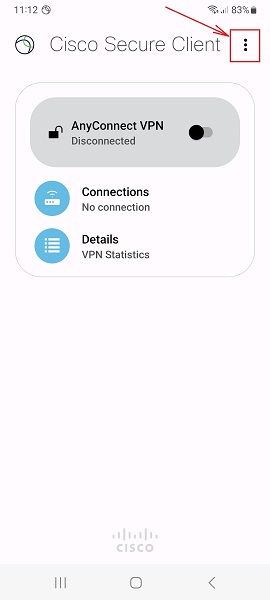
1. Launch “AnyConnect“ app on your Android device and tap 3 dots as shown.
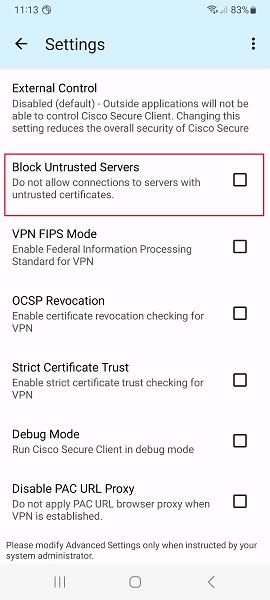
2. Disable (uncheck) Block Untrusted Servers and tap the back arrow.
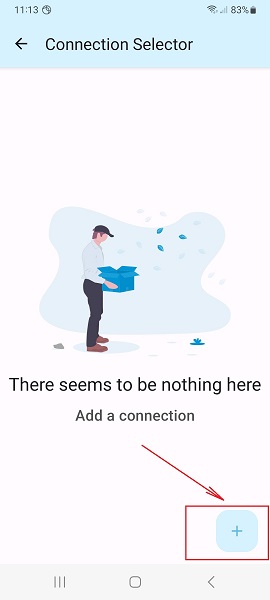
3. Tap + icon to add a new connection.
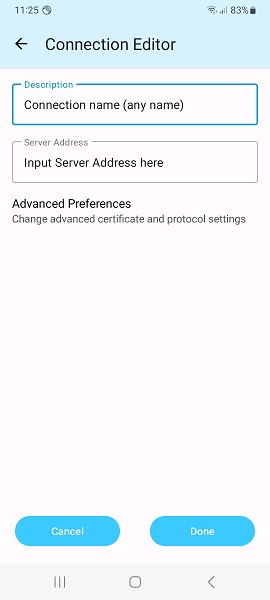
4. Fill the Description (it can be whatever you want).
Input Server Address (it is given in your account data) and tap Done and back arrow.
Note: Server Address must be exactly as in your VPN account data. No extra symbols or spaces are allowed.
5. Switch the switcher on the main screen to the right to connect.
Tap Continue on the pop up window and enter your Username/Password on request.
Wait for the connection and enjoy the Internet.
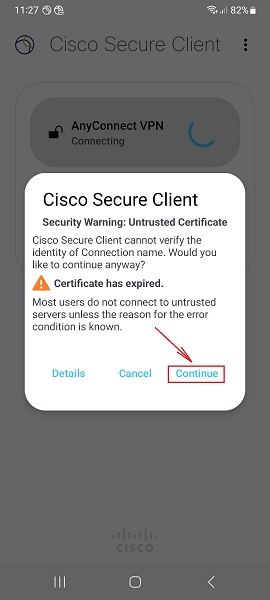
Source: https://sahrzad.online/how-to-setup-sstp-vpn-in-android/
How to Use Threema in UAE Dubai in iPhone
1. Download and install Cisco Anyconnect app from App Store.
2. Open Anyconnect app and in the Settings section switch off “Block Untrusted Servers“.
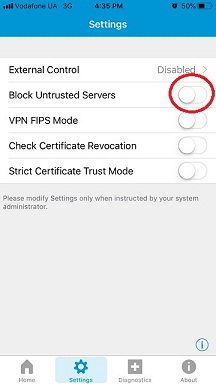
3. Back to Home, tap Connections -> Add VPN Connection.
4. Enter Description (any name) and Server Address (take it from your VPN account data). Tap Save.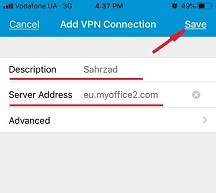
5. Swipe the AnyConnect VPN switch from OFF to ON and tap Continue


6. Input Username tap Connect, input Password, and tap Connect.


7. Wait for the connection.
When you have connected to Sahrzad you can use Threema in the UAE!

You can also read:
Whatsapp calling in UAE Dubai – How to unblock Whatsapp [October 2023]
Skype Dubai Unblock October 2023
How to Unblock Facetime in UAE [October 2023 Update]